Google Chrome crashed
Today morning, my friend "SP" gave a ring, to my cubicle and the conversation was as below:
SP: Maaga, coffee'ge barthya...? (Do you come for coffee ?).
Me: Yes, 5 minutes.
* when I went to cafeteria, I did not see him. Walked towards the smoke zone. He was sitting quietly.SP: Maaga, coffee'ge barthya...? (Do you come for coffee ?).
Me: Yes, 5 minutes.
Me: Yeno Maaga.. (What man?)
SP: Hi! Sit.
* we had a few chat regarding the Ganesha festival celebration and the tasks that he and me was doing.
SP: Did you work on Google Chrome web browser?
Me: No, not yet. How it is tested ?
SP: Don't you have any other words that comes from your mouth? Same words always, how?
Me: Come, let us have a coffee.
Topic Google Chrome crashed begins

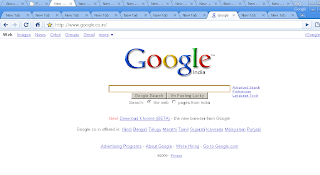
snap showing tabs of two Google Chrome windows.

After having coffee, came back to my cubicle and started downloading the Google Chrome and installed it.
The two tabs were displayed below a opened Window's application title bar (below snap), when I launched the Google Chrome. Maximized the Google Chrome, and saw no title bar. Instead the tab's header displayed a opened website information as a title on tab header; when mouse was moved over tab header, a screen tool tip was displayed with the same information that was on tab's header. Similarly, the progress bar appeared at left bottom of console on moving mouse to URL bar while loading the web page of a site or for any other browsed content.
The two tabs were displayed below a opened Window's application title bar (below snap), when I launched the Google Chrome. Maximized the Google Chrome, and saw no title bar. Instead the tab's header displayed a opened website information as a title on tab header; when mouse was moved over tab header, a screen tool tip was displayed with the same information that was on tab's header. Similarly, the progress bar appeared at left bottom of console on moving mouse to URL bar while loading the web page of a site or for any other browsed content.

snap showing Google Chrome being displayed below a standard Windows title bar.
Started to look for the features that Google Chrome provides apart from the other available browsers. Found few things, among them were 'Task manager', the useful one along with "Report bug or broken website..." and "New incognito window" (which will have a gray ash color being different from normal Google Chrome window) . Entering a web address at URL bar, browser displays the option of typed words for a search using selected Search Engine.
Searching for a phrase or a word in Google Chrome, it highlights all the words/phrases/letters that matches, by giving total number of matched. Moving the up & down arrows, it traverses the matched search item, by giving that particular word/phrase/letter position count in the total numbers of matched item present. Apart from this, the vertical scroll bar of the browser will have the yellow-brownish color lines, where all the matched words present. Which makes easy to look into the line where the phrase/letters/words are present.
Now, started to download few applications from the web. Without asking the user, that do you want to download, it began the download operation (should have been asked like, whether to continue or begin the download operation).
Google has listed the other search engine along with itself. The other search engines listed are Yahoo!, Live Search, AOL and Ask (which gives a feel & kind of message, 'Live and let us Live'). Any one of the five search engine option can be chosen. Yet another feature was, drag and drop of tab to a new browser and a browser window to a tab.Noticed that Google Chrome had good speed when compared to other browsers, but during few operations the speed was dropped down. More than one Image Name i.e., "chrome.exe" was displayed and this depended on the number of tabs that were opened in the Google Chrome browsers (noticed this, when the performance of Google Chrome was slow.) Look and feel was simple, but not to the mark what Google provides and known for. No doubt, all the issues of Look and feel will get fixed in final beta release (I saw only few of them today; testers performing web testing using Google Chrome, can find many more which can be more complicated).
Searching for a phrase or a word in Google Chrome, it highlights all the words/phrases/letters that matches, by giving total number of matched. Moving the up & down arrows, it traverses the matched search item, by giving that particular word/phrase/letter position count in the total numbers of matched item present. Apart from this, the vertical scroll bar of the browser will have the yellow-brownish color lines, where all the matched words present. Which makes easy to look into the line where the phrase/letters/words are present.
Now, started to download few applications from the web. Without asking the user, that do you want to download, it began the download operation (should have been asked like, whether to continue or begin the download operation).
Google has listed the other search engine along with itself. The other search engines listed are Yahoo!, Live Search, AOL and Ask (which gives a feel & kind of message, 'Live and let us Live'). Any one of the five search engine option can be chosen. Yet another feature was, drag and drop of tab to a new browser and a browser window to a tab.Noticed that Google Chrome had good speed when compared to other browsers, but during few operations the speed was dropped down. More than one Image Name i.e., "chrome.exe" was displayed and this depended on the number of tabs that were opened in the Google Chrome browsers (noticed this, when the performance of Google Chrome was slow.) Look and feel was simple, but not to the mark what Google provides and known for. No doubt, all the issues of Look and feel will get fixed in final beta release (I saw only few of them today; testers performing web testing using Google Chrome, can find many more which can be more complicated).
Few basic features and bugs should be sorted out in Google Chrome:
- Clicking on 'New tab' which is available on the left hand side of the browser, does not open a new tab.
- Closing all the tabs that are opened in the browser, makes the Google Chrome to get terminated.
- In a new tab, entering keys 'CTRL + B', makes the bookmarks to get detached from the URL. Say, in the same browser you have a tab which is showing some browsed web information.; entering 'CTRL + B' does not even show the detached bookmarks. This creates void confused thinking in the user. As all the users of Google Chrome are not technical persons and will have same level of thinking and understanding always.
- Before starting to download any contents from web, Google Chrome should prompt the user whether to continue downloading or not. This may save user from various threats by today's web world.
- Home button is not displayed by default. User should try to find where the 'Home' button is located in the browser; later she/he should enabled the option to display the 'Home' button.
- In the below snap shot, observe how the two Google Chrome windows look. The top most tabs displayed are of one Google Chrome window and the second row tabs are of the other Google Chrome window. The top most window's row as taken off word 'Google' from display, as the window being maximized. The second row displays the 'Google' word near the minimizer of the window. Taking off the of product vendor name from display when maximized, is not a good admiralty of the product. In other view, taking off word 'Google' from view in the window on maximizing the browser, can be interpreted as, Google cares for service rather than making up its advertisement (don't know how far this holds good i.e., 'advertisement'. No doubt in its services, which is a good one and that makes Google a unique.).

snap showing tabs of two Google Chrome windows.
- In the above snap, notice the tab header and its contents. It will be difficult to know, what the tab contains, unless the mouse is moved over the tab or by clicking on the tab.
- Many more issues were noticed; while collecting those snaps and writing up those data into my observation book, got a shocking warning message dialog after 4 hours of work with Google Chrome, "Whoa! Google Chrome has crashed. Restart now?".

Google Chrome crash message
I said this news to my friend "MSH" who sits quiet near to me. He showed me the another way of doing it which he read from a web just then, and I was surprised to see it; and all the feel what I had when I saw the CRASHED word on my machine, evaporated like a dew on a lotus leaves. Still, I am happy, that my testing for nearly 4 hours, gave me "Whao! Google Chrome has crashed. Restart now?".
Thanks, SP and MSH for sparing 10 minutes for me.
Thanks, SP and MSH for sparing 10 minutes for me.

